
A digital QR menu your guests open in one scan
For restaurants and cafés in the UAE, Saudi Arabia and the Gulf. No app to install, no PDF to zoom.
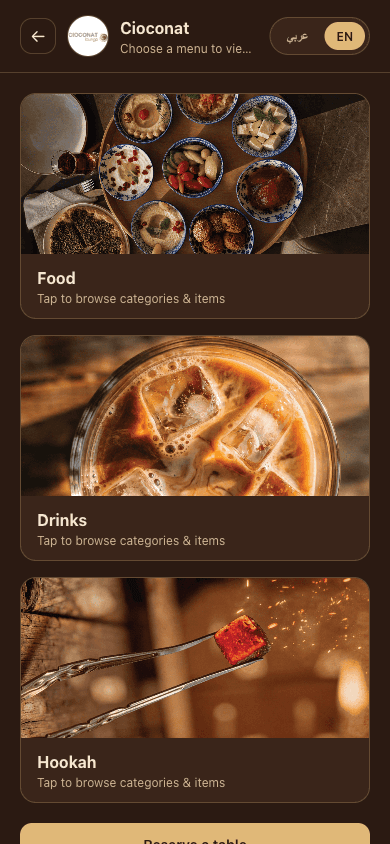
What is a QR menu?
A QR menu is a web page with your menu on it. A guest scans the code on the table and the page opens in the phone's browser, so there is nothing to install and nobody has to make an account.
Unlike a PDF, it fits the screen: no pinching and zooming to read a price. And because it is a page rather than a printed file, you can change it whenever you like, as often as you like.
Most guests already know how to use one: point the camera at the code and tap the link that appears.
Arabic and English, laid out right
Every item has an Arabic and an English name and description. Guests switch language with one tap at the top of the menu, and the Arabic version reads right to left with Arabic category names, instead of English text pushed to the other side of the screen.
Writing the two versions well takes a little care. Our guide to the bilingual Arabic–English menu covers names, descriptions and prices.
Change prices and hide sold-out dishes in seconds
Edit a price, a name or a photo in the AlaMenu dashboard and the change is live the next time someone scans. There is nothing to reprint and nobody to call. Adding a new dish or a new category works the same way.
When a dish runs out, mark it unavailable and it disappears from the menu guests see. Switch it back on when it returns.
Photos, categories and search
Each item can have its own photo and each category its own image, so guests see what they are ordering before they have to ask. Your logo and colours sit at the top, so the page looks like your restaurant rather than ours.
Categories sit in a strip at the top for quick jumps, and a search box filters the menu by dish name and description, in Arabic and in English.
Prices in your currency
Prices show in your restaurant's own currency: AED, SAR, KWD, QAR, OMR, JOD or BHD. Each uses its own decimals: two for the dirham and the Saudi and Qatari riyals, three for the Kuwaiti, Bahraini and Jordanian dinars and the Omani rial. Bahraini prices are written the way Bahrain writes them: BD 1.500.
Print your QR code
Your restaurant gets its own menu link and QR code in the dashboard, ready to print on table cards, stickers or the window. Editing items and prices does not change the code, so the cards you print today keep working. Put one on every table, or a single code at the counter for takeaway orders.
Need a code in your own colours, or one for another link? Use our free QR code generator for menus: PNG or SVG, no sign-up.
Selling in Saudi Arabia
Menus in Saudi Arabia have rules about what they must show, such as calories and allergens. Our guide to Saudi menu requirements sets them out in plain language.
To write the lines themselves, use the free SFDA menu label generator, then add them to each dish's description in both languages.
Table bookings from the same QR code
The same page can take table bookings. Guests tap to reserve and pick a date, a time and a party size, and you confirm from a floor plan that will not let a table be booked twice.
Confirmations go out on WhatsApp and by email. See how the restaurant booking system works. If you don't take bookings, switch them off in your settings and the page shows only the menu.
See a live menu
The Cioconat demo is a full AlaMenu demo menu, with categories, dishes, prices and both languages. Open the demo menu on your phone, search for a dish, then switch to Arabic. It is the same page your guests would see.
Plans
Free
$0
Forever. 1 location, up to 10 items per category, and table bookings included.
Pro
$4.99/month
Unlimited items and up to 2 locations.
Premium
$7.99/month
Unlimited locations, and no AlaMenu branding on your menu page.
Paid plans start with a 14-day trial. Everything in each plan is on the pricing page.
QR menu questions
Do guests need to download an app?
No. The menu opens in the browser the guest already has, on any phone. There is nothing to install and no account to create.
Can I keep my printed PDF menu?
Yes. Send it to us and the AlaMenu team can add it as a button on your menu page, so guests who want the printed version are one tap away. Your digital menu stays the main page.
Is it free?
Yes, on the Free plan, with no time limit and no card: 1 location and up to 10 items per category, with table bookings included. Paid plans add unlimited items and more locations.
What is the difference between a digital menu and a QR menu?
There isn't one. Digital menu, QR menu, online menu and e-menu are names for the same thing: a menu on a web page that guests open by scanning a code.
Does it work for cafés?
Yes. Cafés use it the same way: drinks and food in categories, with photos and prices, and the same QR code on every table or at the counter. Table bookings are optional.